

SSL certificate is the first and most important step in securing your website. So where and how to get an SSL certificate? Are the free options sufficient or should you opt for a paid certificate?
In this guide, we explain the process of purchasing an SSL certificate step by step and compare free and paid options.
Where to Get an SSL Certificate?
There are two basic channels to obtain an SSL certificate:
- SSL Certificate Providers: Resellers such as DataSSL offer certificates from well-known brands such as Sectigo, DigiCert, GeoTrust. Technical support and installation guides are among the advantages.
- Hosting Providers: Some hosting companies include the SSL certificate in the hosting fee or offer it for an additional fee. However, options may be limited.
Step by Step Process of Obtaining an SSL Certificate
1. Determine Your Need
Decide how many domains and subdomains you want to protect:
- Single domain: Single Domain SSL is sufficient
- All subdomains: Prefer Wildcard SSL
- Multiple domains: Select Multi-Domain (SAN) SSL
- E-commerce site: OV or EV SSL recommended
2. Select SSL Type
Select DV, OV or EV SSL based on authentication level. For blogs and personal sites, DV is sufficient; For e-commerce and corporate sites, OV or EV should be preferred.
3. Create CSR
Certificate Signing Request (CSR) is an encrypted code required to apply for a certificate. You can easily generate it from your hosting panel or from our CSR generator.
4. Purchase Certificate and Verify
After purchasing the certificate of your choice, you need to verify the domain. Email, DNS or file-based verification options are available for DV SSL.
5. Install Certificate
After the verification is completed, upload the certificate files to your server. It can be easily done via control panels such as cPanel and Plesk.
Is SSL Certificate Free?
Yes, free SSL certificate options are available. The most well-known free provider is Let's Encrypt. However, there are important differences between free and paid SSL:
| Feature | Free SSL | Paid SSL |
|---|---|---|
| Verification Level | DV Only | DV, OV, EV |
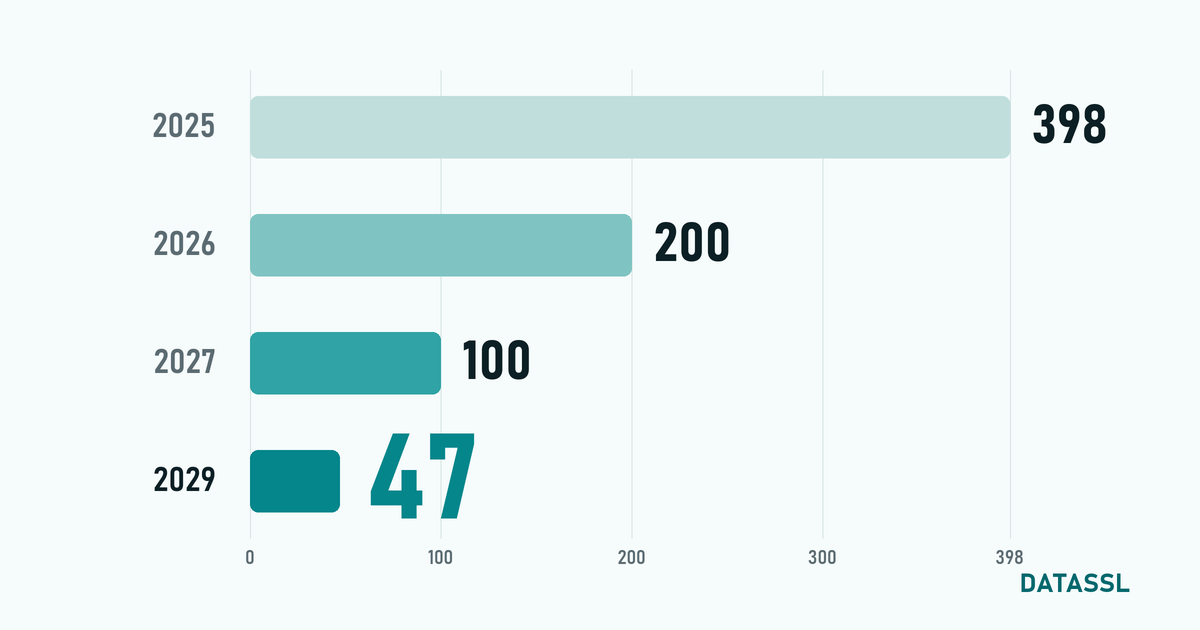
| Validity Period | 90 days | Up to 200 days (reissued within the term on multi-year plans) |
| Warranty | None | Yes (amount depends on the product) |
| Technical Support | Community | Phone, email and ticket |
| Wildcard Support | Yes (limited) | Full support |
| Seal of Trust | None | Yes |
How much is an SSL Certificate?
SSL certificate prices vary depending on type and brand.
You can see the current prices in theIs SSL Certificate Paid?
Both free and paid options are available. For a personal blog or trial project, free SSL may be sufficient. However, a paid SSL certificate is highly recommended for e-commerce, corporate site, or any project that collects customer data. Professional support, warranty and advanced verification levels are only available with paid certificates.
Frequently Asked Questions
Is it difficult to get an SSL certificate?
No. DV SSL certificate can be obtained in minutes. OV and EV certificates may take 1-5 business days due to corporate verification.
Is free SSL safe?
In terms of encryption, it is at the same level of security as paid SSL. However, it does not offer warranty, support and corporate verification.
Conclusion
Getting an SSL certificate is the most basic step in ensuring the security of your website. By choosing the SSL type that suits your needs, you can secure your site in a few simple steps.
Examine DataSSL SSL certificates and protect your site immediately.


Yorumlar
No comments yet. Be the first to comment!
Yorum Yaz