

Renewal processes, reminder settings and automation tips to prevent your SSL certificate from expiring.
📋 Contents
Basic Concepts and Requirements
SSL Certificate Renewal Guide: Do It Before It Expires To understand the subject, we first need to look at the basic concepts. SSL (Secure Sockets Layer) and its more modern version, TLS (Transport Layer Security), are security protocols that encrypt data communication on the internet.
These protocols encrypt the data flow between your web browser and the server, preventing sensitive information such as credit card information, passwords and personal data from being obtained by third parties.
Nowadays, all modern web browsers mark sites that do not use HTTPS as "Not Secure". This situation seriously negatively affects visitor confidence.
Step by Step Application Guide
Here are the steps you need to follow in this regard:
- Planning: Determine which type of certification you need. Do you need a single domain, wildcard or multi-domain?
- CSR Creation: Create the Certificate Signing Request (CSR) file on your server. This is a request file sent to the certificate authority.
- Certificate Purchase: Purchase the SSL certificate that suits your needs through DataSSL.
- Domain Verification: Complete the certificate authority's verification process (e-mail, DNS or file verification).
- Setup: Upload the downloaded certificate files to your server.
- Test: To verify the installation. Use SSL checker tools.
Following each step carefully is critical to a smooth installation process. Make sure that the domain name information is entered correctly, especially during the CSR creation phase.
Note that once the installation is complete, 301 redirect rules must be added to redirect all HTTP traffic to HTTPS. .htaccess is used on Apache servers, and server block configuration is used on Nginx.
Common Problems and Solutions
You may encounter various problems during SSL certificate installation and management. Here are the most common problems and their solutions:
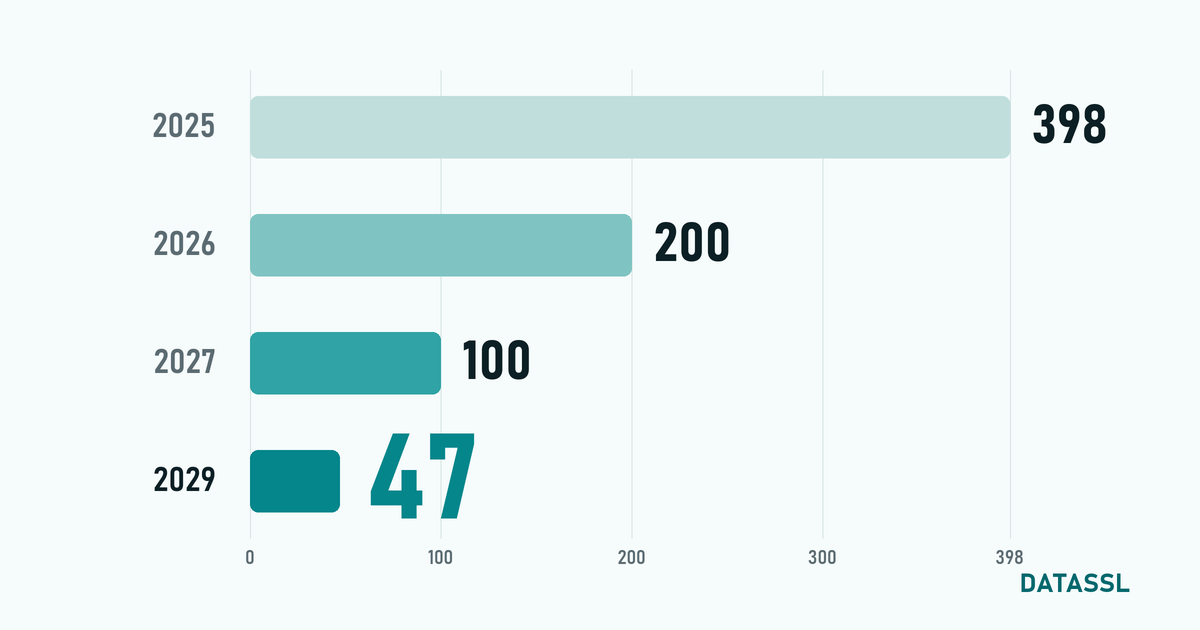
1. Certificate Chain Error: Occurs as a result of incomplete installation of Intermediate certificate files. Make sure to also upload the CA Bundle file provided by the certificate authority to the server. 2. Mixed Content Warning:This warning appears if the page is loading over HTTPS but some resources (image, CSS, JS) are still pulled over HTTP. Update all resource URLs to HTTPS. 3. Certificate Expiration:SSL certificates have an expiration date (at most 200 days since 15 March 2026). Renewal must be made before the period expires. Installing automatic renewal systems avoids this problem. 4. Domain Mismatch: If the domain name for which the certificate is issued does not match the domain name of the website, the browser displays a security warning. Make sure www and non-www versions are also taken into account.Advanced Configuration and Optimization
Beyond the basic setup, optimizing your SSL configuration provides great benefits in terms of both security and performance.
TLS 1.3 Activation: The latest TLS version, 1.3, offers faster handshakes and improved security. Enable your server's TLS 1.3 support and disable legacy protocols (TLS 1.0, 1.1). HSTS Header: Force browsers to always connect to your site over HTTPS by adding the HTTP Strict Transport Security header. Being added to the preload list provides extra security. OCSP Stapling: Enable OCSP Stapling to speed up the certificate verification process. This can shorten connection setup time. Perfect Forward Secrecy: Ensure past traffic cannot be resolved in the future by making ECDHE cipher suites a priority.Best Practices and Checklist
To be successful at this, follow these best practices:
- ✅ Always use a 2048-bit or higher RSA key or a 256-bit ECC key
- ✅ Monitor the certificate duration, renew at least 30 days before it expires
- ✅ Plan the certificate to cover all subdomains
- ✅ Aim for an A+ grade in SSL Labs testing
- ✅ HSTS and CSP security headers configure
- ✅ Set up HTTP to HTTPS 301 redirect
- ✅ Regularly check for mixed content issues
- ✅ Use a certificate monitoring tool
Regularly reviewing this checklist helps keep your SSL configuration up to date.
Conclusion
In this article, we have comprehensively discussed SSL Certificate Renewal Guide: Do It Before It Expires. SSL/TLS security is one of the cornerstones of modern web infrastructure and every website owner should give due importance to this issue.
As DataSSL, we continue to offer SSL certificates from different brands for a secure internet experience. For your questions, you can reach our support team by phone, email or support ticket.
🔒 Secure Your Website Now
Buy your SSL certificate from DataSSL. Installation guides, support by phone, email and ticket; refund if cancelled within 30 days.
Review SSL Certificates →


Yorumlar
No comments yet. Be the first to comment!
Yorum Yaz